Skip to content
Case study 07 · Motion

Animations

Eleven looping UI micro-interactions: hovers, toggles, taps and state changes, each one a perfect loop.
  • Year2026
  • RoleMotion design and art direction
  • TimelineMade 23 October 2026
  • StageLive
  • GPT Image 2.5
  • MiniMax H3
  • Higgsfield
  • ffmpeg
  • React
  • Framer Motion
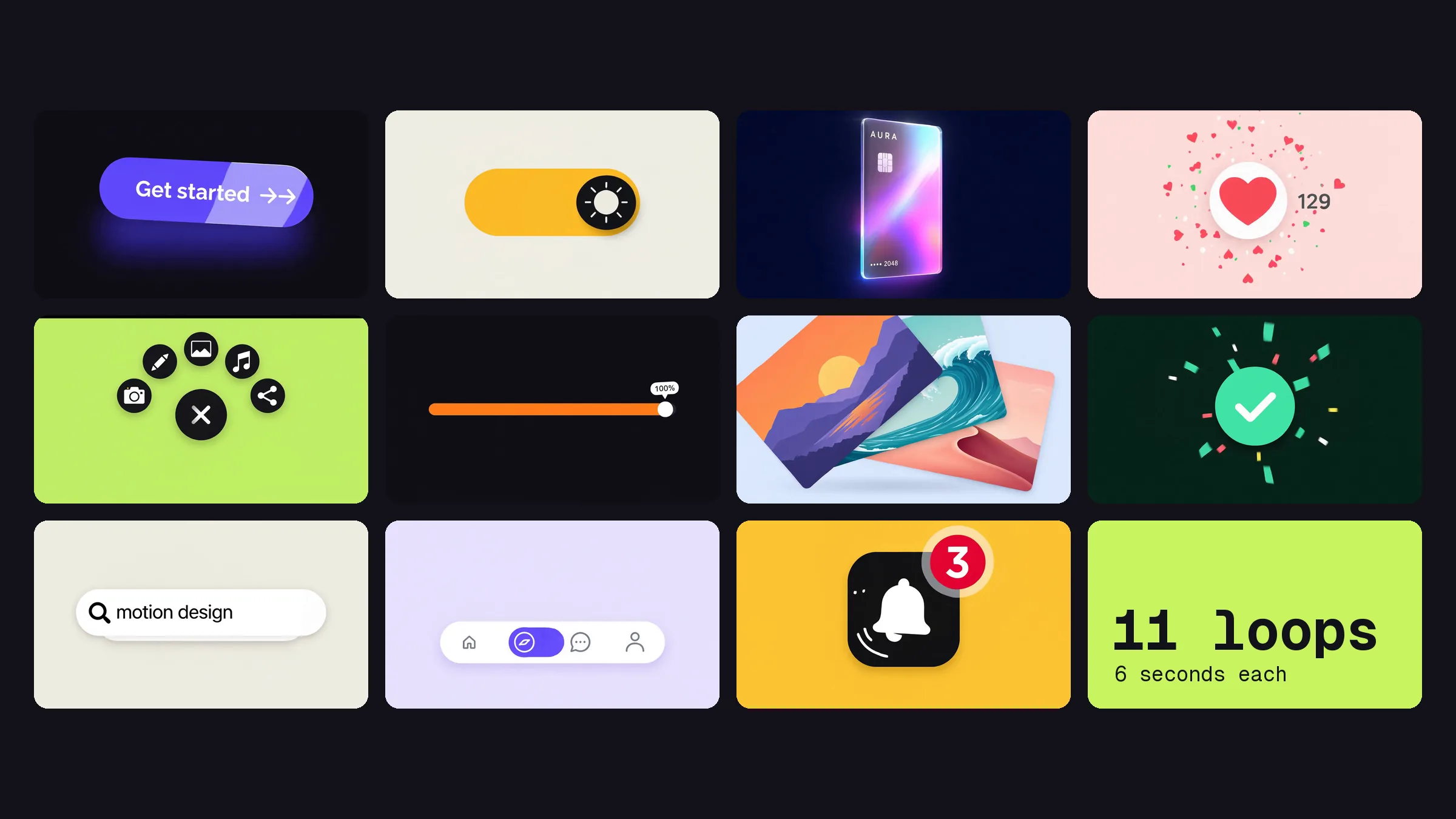
Eleven interface moments on flat colour tiles in a grid: a violet Get started button, a moon toggle, a holographic card, a heart button, a menu button, an orange slider, a stack of photo cards, a Deploy button, a search button, a tab bar and a notification bell.
the first frame is the last frame
Every one loops

A motion study of eleven interface moments, from a magnetic button to a gooey tab bar. Every clip starts and ends on the same frame, so it plays forever without a seam.

The palette

Pick a colour to copy it

At a glance

Project
Animations
What
Motion
Role
Motion design and art direction
Timeline
Made 23 October 2026
Year
2026
Stage
Live
Built with
GPT Image 2.5, MiniMax H3, Higgsfield, ffmpeg, React, Framer Motion
looping micro-interactions
11
per loop, timed beat by beat
6s
frame per loop, used as the first and the last
1
The loops

Eleven of them. Watch one twice.

They play while they're on screen and pause when they leave. Each one has its own pause button.

  • 01Magnetic buttonLeans towards the pointer, catches a sheen, then presses.
  • 02Liquid toggleNight to day and back, with squash and stretch.
  • 03Holographic cardTilts in 3D while the foil shifts colour.
  • 04Like burstThe heart fills, hearts pop and the count rolls over.
  • 05Radial menuThe menu icon becomes a close icon and five actions fan out.
  • 06Elastic sliderThe thumb runs to 100% and the track glows when it lands.
  • 07Card fanA stack of photo cards spreads out, then tidies itself.
  • 08Deploy buttonPress, progress bar, tick, then back to Deploy.
  • 09Expanding searchA round button stretches into a search bar and types.
  • 10Gooey tab barThe active blob stretches from tab to tab.
  • 11Notification bellThe bell rings, a badge pops on with a 3, then clears.
01

The problem

Hover states and micro-interactions are where an interface feels alive or dead. They're also the hardest thing to show. A screenshot of a button tells you nothing about how it presses.

I wanted a set of them I could point to. Small, polished and moving, the way they'd look in a real product.

02

The approach

One rule did most of the work: the first frame and the last frame are the same picture.

For each animation I made one still in GPT Image 2.5: the component at rest, on a flat colour, front on. Then I gave MiniMax H3 that same still as both the start frame and the end frame, so the model has to come home to exactly where it started. The loop is built in, not cut in afterwards.

The prompts follow the source-video rules from motion2code, an open-source skill on GitHub:

  • Flat colour and a locked camera. No camera moves, no lighting tricks, nothing that drifts between the first frame and the last.
  • Timed beat by beat. Every prompt runs second by second: what moves, how it eases and when it settles.
  • It needs to loop. Every prompt says so, and says the last frame matches the first.
03

What I built

Eleven loops, each six seconds:

  • Magnetic button. Leans towards the pointer, catches a sheen, then presses with a ripple.
  • Liquid toggle. Night to day and back, with squash and stretch on the knob.
  • Holographic card. Tilts in 3D while the foil shifts colour.
  • Like burst. The heart fills, confetti pops and the counter rolls over.
  • Radial menu. The menu icon turns into a close icon and five actions fan out.
  • Elastic slider. The thumb runs to 100% and the track glows when it lands.
  • Card fan. A stack of photo cards spreads out like a hand of cards, then tidies itself.
  • Deploy button. Press, progress bar, tick, then back to Deploy.
  • Expanding search. A round button stretches into a search bar and types its own query.
  • Gooey tab bar. The active blob stretches from tab to tab.
  • Notification bell. The bell rings, a badge pops on with a 3, then clears.

On this page they only load when you scroll to them, play while they're on screen and pause when they leave. If your device asks for reduced motion, they wait on their first frame until you press play.

04

How it went

They're all on this page, playing as you scroll past.

Some of the same moves made it into this site too. The black buttons now catch a sheen when you hover them, the same one the Get started button does in the first loop.

Features

What's inside.

  • Perfect loops

    The same still is the first and last frame, so nothing jumps when a loop restarts.

  • Eleven palettes

    Every loop has its own flat colour scheme, like screens from one product.

  • Timed beat by beat

    Every prompt runs second by second, from the first move to the settle.

  • Locked camera

    No camera moves, so the eye stays on the interaction.

  • Light on the page

    Each loop loads only when it scrolls into view, then pauses when it leaves.

  • Reduced motion

    If your device asks for less motion, the loops wait until you press play.

Gallery

Open any of them full size.

The foil catches the light as the card tilts.

  • The stack fans out like a hand of cards.

  • Hearts and confetti on the like.

  • Press, progress, tick.

The short version

  • Eleven six-second loops, from a magnetic button to a notification bell
  • Each one uses the same still as its first and last frame
  • Made with GPT Image 2.5 and MiniMax H3
  • Loads only on scroll, with a pause button on every loop

Did this one land?

Leave a reaction. It's anonymous and it makes my day.

React to this

Want one of these?

Tell me what you're working on. If I'm not the right fit, I'll say so.